Showing posts with label photo. Show all posts

Friday, September 19, 2014

This and That

I'm cleaning out my room (again).  I started adding some new items that had come in the mail to my already ridiculous stash.  Since moving last year, I promised I wouldn't outgrow my space.  Well, I'm getting to the point where thats happening.  I don't scrapbook enough but I sure like to shop.  Hello, have you *seen* the Halloween lines??  I'm a sucker for some cute Halloween lines.  Frankie and Friends from Simple Stories and Jillibean Soup arrived this week.

So its time to move some of the older lines out and make room for the new.  Clean out those boxes of tags and half used product packages.  Sometimes you just have to cut loose what you know you wont use.  The packs of tags and diecuts you keep reaching for but the items never quite make it to your page...

Or there's the treasure you find that you forgot you had.  In this case, it was a stash of items from Chic Tags.  Some of the original tags from Veronica that were perfect for this layout.


There is a nice mix of products on this page.  I literally pulled items together from drawers, leftovers etc.

Blue/Green Ombre Washi is from a past Studio Calico Kit
Anchor is from Glitz Designs nautical line
Tags are Chic Tags
Not sure where I got the flag at the top.....
Enamel dots are from my collection of dots (I'll have a post up next week about my dot issue)
and of course, a piece of flair from A {Flair} for Buttons Etsy shop.
I used my Silhouette to cut the title from a piece of leftover paper from a Studio Calico kit.  


Thursday, May 30, 2013

Nice relaxing Memorial Day

Just trying to escape the rat race a little bit this week.  Tired of reading negative things all over the internet and that work is consuming my life these days.  Taking a step back.

This boy turns 6 in July.  (Don't know where the time goes.)
(we went to the park before hitting the beach and I got a few decent shots with my iphone)

I'm going to be brave this year and do a photo shoot with him.  No expensive photographer, just me.  I have the camera so why not, right?  Right?  (I'm scared.)

I just don't think I know how to use this camera well enough to get the shots I want so I'm practicing.  I have a good month to play around with settings and PS.

I got a few decent shots at the beach today.

 Treasure Island Beach


 There are some awesome tide pools here but the tide was coming in so I only got a few minutes of time wondering around.


 This is one of my favorites from the day.  
 Obligatory name in the sand shot.
 We were stalking the lifeguard tower all day.  Waiting for the lifeguard to go home.  I'm usually a rule follower but this one time I broke it.

 Looking into the sunset.
 The beach is attached to the Montage Resort in Laguna Beach.  One day I will stay here.
 The tide pools I mentioned earlier are down there.  I wanted to get pictures of N in that little cave but its a popular spot.  Pregnancy photo shoots, proposals, engagement shoots - you name it, it was happening in that little spot.  So we skipped it for now.
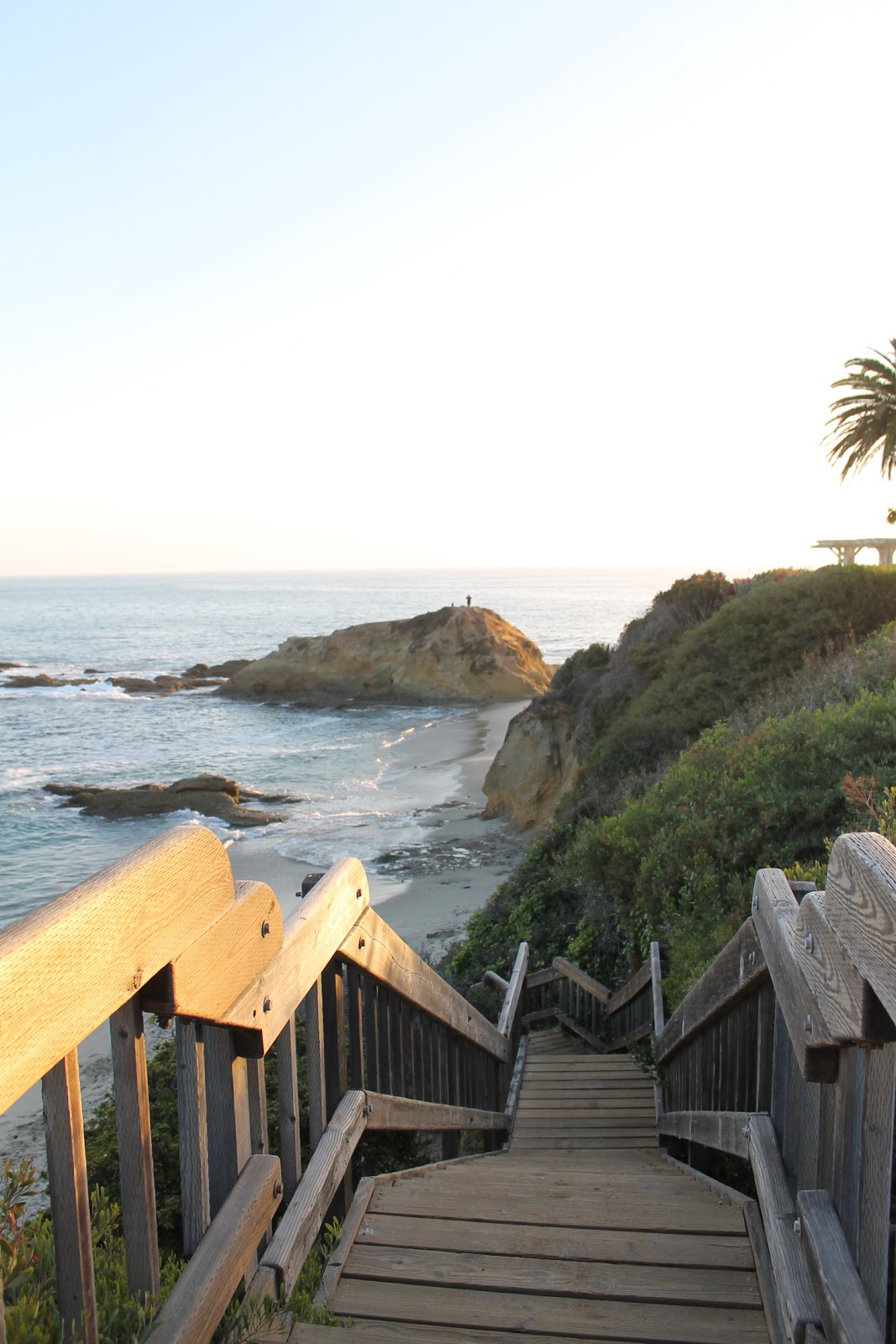
 All of the little beaches/coves are accessible by these cute wooden stairs.
 A milestone we're looking at this year is learning to ride his bike without training wheels.  Its not happening.  He spent 5 minutes on the bike and after some tears, we put the wheels back on.  This kid can skate circles around most adults on two thin blades but he loves his training wheels.
 Playing around with the new Elsie Flannigan Instagram App.  I'm not one for these fancy things but I really like this app.  And I probably spent a few bucks on the add-ons too.
 A crab in the tide pools.  The one lone creature I came across.  Well, there was a sea snail but he wasn't as cool as the crab.
So now I'm editing the photos and having them printed to see how they look.  I just placed my first order with Persnickety Prints to see their quality.

Tuesday, May 21, 2013

Love for Picasa

I started Project Life last year and loved doing it.  After a few weeks the picture editing and printing got to be too much.  I bought a Canon Selphy but the quality was less than what I hoped for even for the project.

I gave up after 19 weeks because it was so difficult to get a true 3x4 photo printed without jumping through hoops for the programs that did offer it.  I gave up.  It just wasn't worth the hassle.  I researched different programs and options but nothing worked easily.  Or it wasn't compatible with a Mac.

I decided to do PL again this year but instead of a weekly 2 page spread, I focused more on the monthly type layouts.  I will not take 30 pictures each week and try to fit as many as I can in.  And with Picasa, I can get the true 3x4 printed 2-up on a 4x6 sheet of photo paper.  I read on a message board that Picasa has a template.  They sure do!

Took me 10 minutes to select the photos, upload them to Picasa and then print them.  I'm actually excited to work on my PL again and I love my monthly spread so much better!

A quick tutorial:


STEP 1:  Once you've downloaded Picasa, the program will import all of the photos on your computer.  (I have a Mac so my screen might look different than yours.)  I already have all of my photos sorted in folders the way *I* like them so I just ignore the folders in Picasa.  I have a Project Life folder for each month.  As I take photos with my camera or phone, I upload them here for end of the month editing.

STEP 2: Select two photos that you want to import to the 4x6 canvas.  To make things easier, I use the flip tool at the bottom to flip my pictures to the same orientation.  Hold your shift key down and click on each photo with your mouse.

STEP 3: Click the 'Create Collage' button.  You'll get the preview below.  This is where you can edit the photos as well.
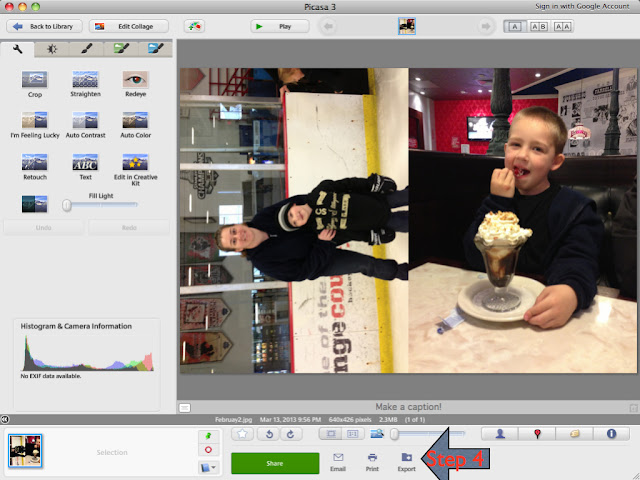
STEP 4: Click the 'export' button to save the photo to a folder on your computer.

STEP 5: Save the photo and print!  I use my Canon Pixma to print once I've got all of the collages saved.
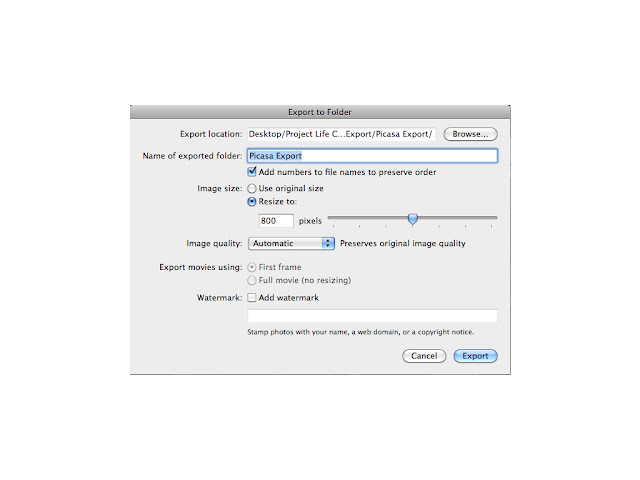
Final product looks like this:


 You can upload these to any online processor if you don't have print at home capabilities.

January PL Pages


And since there are virtually NO purple products out there I had to make my own.  Luckily, I didn't have to look too far.  Studio Calico just released a limited edition set of mini Mister Hueys which included this cool purple.  Now, the Kings don't have purple in their jersey/logo anymore but they will always in my mind.  Plus, these pages needed a pop of color.  I stuck with black/silver and white throughout and added the purple.  The hearts and stars are from Pink Paislee and the sticker letters are from Basic Grey.  I used some black and white ones (tinted purple).

To get the purple letters I used a small paint brush and dipped it into an open Mister Huey.  I used several coats to make sure I got the color I wanted.  I also have about 10 sheets of this font because I like to keep white on hand for projects like this.  If you use mists or any other water based color agent, you'll want to let the letters dry for a few hours.  Using them while they're went will cause them to rip.  Avoid using a heat tool to dry them quicker.  This seems to melt the adhesive.  I've attempted this several times and figured out the best way to do this.  Not all sticker letters will be the same but with these BG ones, this is the best method.  Air dry works best.  For this project, I laid everything out, planned my page and then colored the letters I needed.  While they were drying, I was washi taping, gluing and decorating the 4x6 cards.  The last step was adhering the dry mini letters.

Sunday, November 11, 2012

We are family

A couple of years ago, I contacted someone I used to work with at my last job.  After the major layoffs, we all went off to find other jobs, starts our own ventures etc.

She started her own photography business and I was lucky to snag an afternoon with her.  She did such a great job capturing Nick's personality.

These were some of my favorite shots from the afternoon.


I used the Simple Stories fall line again because the colors match so well.  Some older Thickers, burlap string and a sketch from Scrapbook Generation.

Tuesday, July 3, 2012

Where did June go?

I'm really not sure how it got to be July 3rd already.  I'm pretty sure I missed most of June.

I know the playoffs kept me busy.  And then there was that pesky new job......

I didn't craft much last month and thats going to change in July.  I already have a girls night planned for this weekend and my bags are packed!  I will be gone for over a week on vacation - can't wait!

One of the things thats cool is I've *finally* figured out the Canon ePrint app on my phone.  For some reason it wouldn't recognize my printer.  I ran an update on the app a few weeks ago because it popped up in my updates folder on my iphone.  All of a sudden, it works!

So I've been printing photos on my Canon printer for the *first* time since I bought it.  I love my little Selphy but the photos are so-so.  So I'm back to printing newer photos and getting things printed quickly to scrap.  I can throw a page together whenever I feel like it.  Problem is, time.

I have very little time.  Not to mention that its Summer and I want to spend time with N.   That means more late night scrapping!

I've got a few fun things up my sleeve though.

1.  Vacation posts - I can blog from my phone so there might be some cool vacation posts while I'm gone.  Who wouldn't want to see the Canadian Rockies or the Calgary Stampede?

 All photos are from our 2011 trip.

 Stampede Band.
 Chuckwagon races

 Canadian Rockies

 Lake Louise

 Athabasca Glacier
I still have no idea how I captured such a perfect shot.

2.  I have some crafty posts saved up to share with you while I'm gone.

3. I'm working on a few things right now that I'll share.

So for now, if you remember this post......we got our official Hi-Res photos from the photographer doing the project.  This is something on his Bucket List.  He's using his time and equipment for *no* money from any of us - we just have to show up at his studio on the dates he's offering to do this and wait.  Its for a good cause too - we're raising money for Be The One Match and swabbing for donors.  


And I found out that the Kings organization has picked up on this and will be sponsoring it from this point forward.  Pretty cool.

I had so much fun last time that I thought of a new photo idea.  It sparked a few others just like it which is cool!  My grandfather was one of the original employees for the Kings so my mom and I were raised as fans.  Obviously, my son has followed us into fandom so I took them all up there for a 4 Generation photo.  Here are the proofs.  I CANNOT wait to get the Hi -Res photos to scrap!

Someone snapped this photo of them leaving and I think its just cool.  62 years of marriage and they still agree on one thing.....

Go Kings!